Indoor WiFi Hotspot Setup Guide
Thank you for joining the Meshly network! Setup is quick and easy: power up the device, plug it into the internet, and mount it in an optimal location.
What's in the Box
Meshly Indoor Hotspot
6ft Ethernet Cable
Power Adapter
Mounting Bracket
Ideal Placement
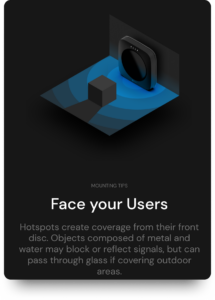
Face Your Users
Orient the device toward where customers spend time
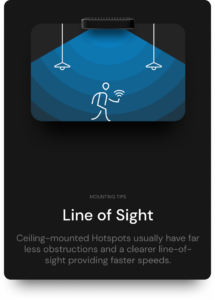
Clear Line of Sight
Avoid obstructions like walls and metal objects
- Open and elevated - approximately 5 feet off the floor
- Centrally positioned - facing the busiest part of your business
- Clear line of sight - away from obstructions like walls and metal objects
- Face users - orient the device toward where customers spend time
Power & Network Options
Option 1: Standard Power Adapter (Default)
For locations where the hotspot is near both the internet router and a wall outlet.
- 1. Plug the power adapter into a wall outlet
- 2. Connect the Ethernet cable from the hotspot to your router
- 3. Wait for the device to power on (LEDs will blink during startup)
Need a longer Ethernet cable? Contact us - we provide longer cables free of charge.
Option 2: Power-over-Ethernet (PoE)
For placements far from power outlets. Provides cleaner cable runs and better placement flexibility.
- 1. Connect one Ethernet cable from your router to the PoE injector
- 2. Connect another Ethernet cable from the PoE injector to the hotspot
- 3. Plug the PoE injector into a wall outlet
Need a PoE injector? Contact us - we can ship one at no cost.
Mounting Options
Screw-Mount Bracket
Permanent installation with the strongest hold. Recommended for long-term placement.
Shelf/Flat Surface
Easy to move and reposition. Less secure but more flexible.
Verifying Online Status
After powering up, the device's LEDs will blink during updates (2-3 minutes).
Final Step: Confirm Placement
Send a photo of the installed hotspot to your Meshly representative so we can submit it to AT&T and T-Mobile for activation.
Email your photo to hello@meshly.io or text it to +1 (619) 432-3805.
Setup FAQ
When will the hotspot start earning?
After installation, Meshly submits the hotspot for carrier approval (3-7 days). Once approved, AT&T and T-Mobile subscribers will auto-connect when they enter your venue. You earn ~$0.02 per GB of data they use.
Can customers manually connect?
No. The network is password-protected and cannot be manually joined. Only approved carrier subscribers will auto-connect.
Can I enable guest WiFi on the hotspot?
Yes, Meshly can enable a guest WiFi network if desired. Note that data on the guest network does not generate revenue.
Where can I view my earnings?
Track your earnings, data usage, and unique users through your Meshly dashboard.